最近在自学 Java Web 开发, 听到公司 .Net 组经常说到一个词, 单点登录, 于是乎想着自己是否能用 Java 来实现一下, 于是有了下面的文章。
单点登录
简称为 SSO,是目前比较流行的企业业务整合的解决方案之一。SSO的定义是在多个应用系统中,用户只需要登录一次就可以访问所有相互信任的应用系统。
我们需要创建的目标
我们要创建3个独立的系统
- 1 个认证系统: 将被部署在
localhost:8080
- 2 个资源系统(为了简化, 我们使用相同的代码): 将分别被部署在
localhost:8180 和 localhost:8280
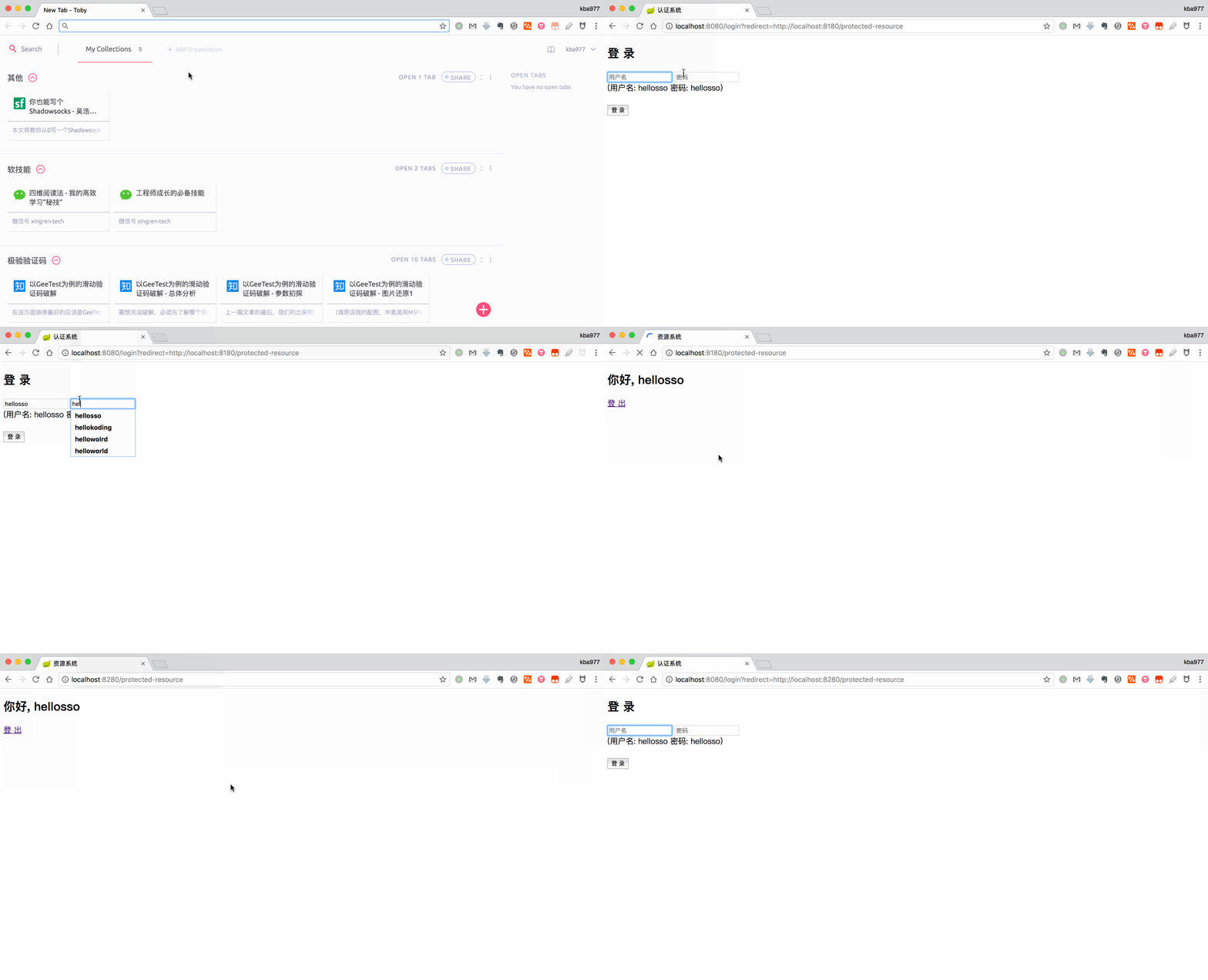
我要需要的环境
用到的技术栈
- Java
- Single Sign On (SSO)
- Json Web Token (Jwt)
- Spring Boot
- Freemarker
关于什么是 JWT, 这里推荐下面几篇文章, 讲解的比较清楚.
认证系统
项目结构
.
├── src
│   └─ main
│       ├── java
│       │   └── com
│       │       └── example
│       │           └── sso
│       │               ├── SsoApplication.java
│       │               └── auth
│       │                   ├── CookieUtil.java
│       │                   ├── JwtUtil.java
│       │                   └── LoginController.java
│       ├── resources
│       │   └── application.properties
│       └── webapp
│          └── login.ftl
└── pom.xml
项目依赖
pom.xml
1
2
3
4
5
6
7
8
9
10
11
12
13
14
15
16
17
18
19
20
21
22
23
24
25
26
27
28
29
30
31
32
33
34
35
36
37
38
39
40
41
42
43
44
45
46
47
48
49
50
51
52
53
54
55
56
57
58
59
60
| <?xml version="1.0" encoding="UTF-8"?>
<project xmlns="http://maven.apache.org/POM/4.0.0" xmlns:xsi="http://www.w3.org/2001/XMLSchema-instance"
xsi:schemaLocation="http://maven.apache.org/POM/4.0.0 http://maven.apache.org/xsd/maven-4.0.0.xsd">
<modelVersion>4.0.0</modelVersion>
<groupId>com.example</groupId>
<artifactId>sso</artifactId>
<version>0.0.1-SNAPSHOT</version>
<packaging>jar</packaging>
<name>sso</name>
<description>Demo project for Spring Boot</description>
<parent>
<groupId>org.springframework.boot</groupId>
<artifactId>spring-boot-starter-parent</artifactId>
<version>1.5.9.RELEASE</version>
<relativePath/>
</parent>
<properties>
<project.build.sourceEncoding>UTF-8</project.build.sourceEncoding>
<project.reporting.outputEncoding>UTF-8</project.reporting.outputEncoding>
<java.version>1.8</java.version>
</properties>
<dependencies>
<dependency>
<groupId>org.springframework.boot</groupId>
<artifactId>spring-boot-starter-freemarker</artifactId>
</dependency>
<dependency>
<groupId>org.springframework.boot</groupId>
<artifactId>spring-boot-starter-web</artifactId>
</dependency>
<dependency>
<groupId>org.springframework.boot</groupId>
<artifactId>spring-boot-starter-test</artifactId>
<scope>test</scope>
</dependency>
<dependency>
<groupId>io.jsonwebtoken</groupId>
<artifactId>jjwt</artifactId>
<version>0.6.0</version>
</dependency>
</dependencies>
<build>
<plugins>
<plugin>
<groupId>org.springframework.boot</groupId>
<artifactId>spring-boot-maven-plugin</artifactId>
</plugin>
</plugins>
</build>
</project>
|
CookieUtil
Jwt Token 将通过 Cookies 保存和提取
src/main/java/com/example/sso/auth/CookieUtil.java
1
2
3
4
5
6
7
8
9
10
11
12
13
14
15
16
17
18
19
20
21
22
23
24
25
26
27
28
29
30
31
| package com.example.sso.auth;
import org.springframework.web.util.WebUtils;
import javax.servlet.http.Cookie;
import javax.servlet.http.HttpServletRequest;
import javax.servlet.http.HttpServletResponse;
public class CookieUtil {
public static void create(HttpServletResponse httpServletResponse, String name, String value, Boolean secure, Integer maxAge, String domain) {
Cookie cookie = new Cookie(name, value);
cookie.setSecure(secure);
cookie.setHttpOnly(true);
cookie.setMaxAge(maxAge);
cookie.setPath("/");
httpServletResponse.addCookie(cookie);
}
public static void clear(HttpServletResponse httpServletResponse, String name) {
Cookie cookie = new Cookie(name, null);
cookie.setPath("/");
cookie.setHttpOnly(true);
cookie.setMaxAge(0);
httpServletResponse.addCookie(cookie);
}
public static String getValue(HttpServletRequest httpServletRequest, String name) {
Cookie cookie = WebUtils.getCookie(httpServletRequest, name);
return cookie != null ? cookie.getValue() : null;
}
}
|
cookie.setSecure(secure): secure=true => 仅仅能在 HTTPS 连接中被浏览器传递到服务器端进行会话验证.
cookie.setHttpOnly(true): 使得 Javascript 脚本不能读取 cookies.
cookie.setMaxAge(maxAge): 设置 Cookies 的过期值. maxAge=0 => 立即过期, maxAge=-1 => 永不过期
cookie.setDomain(domain): Cookies 仅对设置的域名可见.
cookie.setPath("/"): Cookies 对所有路径可见.
JwtUtil
我们使用 JJWt 来生成和解析 JWT Token.
src/main/java/com/example/sso/auth/JwtUtil.java
1
2
3
4
5
6
7
8
9
10
11
12
13
14
15
16
17
18
19
20
21
22
23
24
25
26
27
28
29
| package com.example.sso.auth;
import io.jsonwebtoken.JwtBuilder;
import io.jsonwebtoken.Jwts;
import io.jsonwebtoken.SignatureAlgorithm;
import javax.servlet.http.HttpServletRequest;
import java.util.Date;
public class JwtUtil {
public static String generateToken(String signingKey, String subject) {
long nowMillis = System.currentTimeMillis();
Date now = new Date(nowMillis);
JwtBuilder builder = Jwts.builder()
.setSubject(subject)
.setIssuedAt(now)
.signWith(SignatureAlgorithm.HS256, signingKey);
return builder.compact();
}
public static String getSubject(HttpServletRequest httpServletRequest, String jwtTokenCookieName, String signingKey) {
String token = CookieUtil.getValue(httpServletRequest, jwtTokenCookieName);
if (token == null) return null;
return Jwts.parser().setSigningKey(signingKey).parseClaimsJws(token).getBody().getSubject();
}
}
|
LoginController
src/main/java/com/example/sso/auth/LoginController.java
1
2
3
4
5
6
7
8
9
10
11
12
13
14
15
16
17
18
19
20
21
22
23
24
25
26
27
28
29
30
31
32
33
34
35
36
37
38
39
40
41
42
43
44
45
46
| package com.example.sso.auth;
import org.springframework.stereotype.Controller;
import org.springframework.ui.Model;
import org.springframework.web.bind.annotation.RequestMapping;
import org.springframework.web.bind.annotation.RequestMethod;
import javax.servlet.http.HttpServletResponse;
import java.util.HashMap;
import java.util.Map;
@Controller
public class LoginController {
private static final String jwtTokenCookieName = "JWT-TOKEN";
private static final String signingKey = "signingKey";
private static final Map<String, String> credentials = new HashMap<>();
public LoginController() {
credentials.put("hellokoding", "hellokoding");
credentials.put("hellosso", "hellosso");
}
@RequestMapping("/")
public String home() {
return "redirect:/login";
}
@RequestMapping("/login")
public String login() {
return "login";
}
@RequestMapping(value = "login", method = RequestMethod.POST)
public String login(HttpServletResponse httpServletResponse, String username, String password, String redirect, Model model) {
if (username == null || !credentials.containsKey(username) || !credentials.get(username).equals(password)) {
model.addAttribute("error", "Invalid username or password!");
return "login";
}
String token = JwtUtil.generateToken(signingKey, username);
CookieUtil.create(httpServletResponse, jwtTokenCookieName, token, false, -1, "localhost");
return "redirect:" + redirect;
}
}
|
为了简化, 我们使用 Hash Map (credentials) 作为用户数据库.
视图 (View Template)
src/main/webapp/login.ftl
1
2
3
4
5
6
7
8
9
10
11
12
13
14
15
16
17
18
19
| <!doctype html>
<html lang="en">
<head>
<title>认证系统</title>
</head>
<body>
<form action="/login?redirect=${RequestParameters.redirect!}" method="POST">
<h2>Login in</h2>
<input type="text" name="username" placeholder="用户名" autofocus="true" />
<input type="text" name="password" placeholder="密码" />
<div>(用户名: hellokoding 密码: hellokoding)</div>
<div style="color: red">${error!}</div>
<br />
<button type="submit">登 录</button>
</form>
</body>
</html>
|
应用配置
src/main/resources/application.properties
1
2
| spring.freemarker.template-loader-path=/
spring.freemarker.suffix=.ftl
|
src/main/java/com/example/sso/SsoApplication.java
1
2
3
4
5
6
7
8
9
10
11
12
13
14
15
16
17
18
19
| package com.example.sso;
import org.springframework.boot.SpringApplication;
import org.springframework.boot.autoconfigure.SpringBootApplication;
import org.springframework.boot.builder.SpringApplicationBuilder;
import org.springframework.boot.web.support.SpringBootServletInitializer;
@SpringBootApplication
public class SsoApplication extends SpringBootServletInitializer {
@Override
protected SpringApplicationBuilder configure(SpringApplicationBuilder builder) {
return builder.sources(SsoApplication.class);
}
public static void main(String[] args) {
SpringApplication.run(SsoApplication.class, args);
}
}
|
启动
1
| mvn clean spring-boot:run
|
资源系统
项目结构
.
├── pom.xml
├── src
│   └── main
│       ├── java
│       │   └── com
│       │       └── example
│       │           └── sso
│       │               ├── SsoApplication.java
│       │               └── auth
│       │                   ├── CookieUtil.java
│       │                   ├── JwtFilter.java
│       │                   ├── JwtUtil.java
│       │                   └── ResourceController.java
│       ├── resources
│       │   ├── application.properties
│       └── webapp
│           └── protected-resource.ftl
└── sso.iml
项目依赖
和认证系统 pom.xml 一致, 无须修改.
JwtFilter
JwtFilter 用来使请求强制通过 SSO. 如果 JWT Token 不存在(未认证), 则重定向到认证系统进行认证. 如果 JWT TOKEN 存在(已认证), 则从中提取出用户信息, 并通过请求.
src/main/java/com/example/sso/auth/JwtFilter.java
1
2
3
4
5
6
7
8
9
10
11
12
13
14
15
16
17
18
19
20
21
22
23
24
25
26
27
28
29
| package com.example.sso.auth;
import org.springframework.stereotype.Component;
import org.springframework.web.filter.OncePerRequestFilter;
import javax.servlet.FilterChain;
import javax.servlet.ServletException;
import javax.servlet.http.HttpServletRequest;
import javax.servlet.http.HttpServletResponse;
import java.io.IOException;
@Component
public class JwtFilter extends OncePerRequestFilter {
private static final String jwtTokenCookieName = "JWT-TOKEN";
private static final String signingKey = "signingKey";
@Override
protected void doFilterInternal(HttpServletRequest httpServletRequest, HttpServletResponse httpServletResponse, FilterChain filterChain) throws ServletException, IOException {
String username = JwtUtil.getSubject(httpServletRequest, jwtTokenCookieName, signingKey);
if (username == null) {
String authService = this.getFilterConfig().getInitParameter("services.auth");
httpServletResponse.sendRedirect(authService + "?redirect=" + httpServletRequest.getRequestURL());
} else {
httpServletRequest.setAttribute("username", username);
filterChain.doFilter(httpServletRequest, httpServletResponse);
}
}
}
|
ResourceController
1
2
3
4
5
6
7
8
9
10
11
12
13
14
15
16
17
18
19
20
21
22
23
24
25
26
27
| package com.example.sso.auth;
import org.springframework.stereotype.Controller;
import org.springframework.web.bind.annotation.RequestMapping;
import javax.servlet.http.HttpServletResponse;
@Controller
public class ResourceController {
private static final String jwtTokenCookieName = "JWT-TOKEN";
@RequestMapping("/")
public String home() {
return "redirect:/protected-resource";
}
@RequestMapping("/protected-resource")
public String protectedResource() {
return "protected-resource";
}
@RequestMapping("/logout")
public String logout(HttpServletResponse httpServletResponse) {
CookieUtil.clear(httpServletResponse, jwtTokenCookieName);
return "redirect:/";
}
}
|
视图 (View Template)
src/main/webapp/protected-resource.ftl
1
2
3
4
5
6
7
8
9
10
| <!doctype html>
<html lang="en">
<head>
<title>资源系统</title>
</head>
<body>
<h2>你好, ${Request.username!}</h2>
<a href="/logout">登 出</a>
</body>
</html>
|
应用配置
src/main/resources/application.properties
1
2
3
4
| spring.freemarker.template-loader-path=/
spring.freemarker.suffix=.ftl
services.auth=http://localhost:8080/login
|
src/main/java/com/example/sso/SsoApplication.java
1
2
3
4
5
6
7
8
9
10
11
12
13
14
15
16
17
18
19
20
21
22
23
24
25
26
27
28
29
30
31
32
33
34
35
36
37
38
| package com.example.sso;
import com.example.sso.auth.JwtFilter;
import org.springframework.beans.factory.annotation.Value;
import org.springframework.boot.SpringApplication;
import org.springframework.boot.autoconfigure.SpringBootApplication;
import org.springframework.boot.builder.SpringApplicationBuilder;
import org.springframework.boot.web.servlet.FilterRegistrationBean;
import org.springframework.boot.web.support.SpringBootServletInitializer;
import org.springframework.context.annotation.Bean;
import java.util.Collections;
@SpringBootApplication
public class SsoApplication extends SpringBootServletInitializer {
@Value("${services.auth}")
private String authService;
@Bean
public FilterRegistrationBean jwtFilter() {
final FilterRegistrationBean registrationBean = new FilterRegistrationBean();
registrationBean.setFilter(new JwtFilter());
registrationBean.setInitParameters(Collections.singletonMap("services.auth", authService));
registrationBean.addUrlPatterns("/protected-resource");
return registrationBean;
}
@Override
protected SpringApplicationBuilder configure(SpringApplicationBuilder builder) {
return builder.sources(SsoApplication.class);
}
public static void main(String[] args) {
SpringApplication.run(SsoApplication.class, args);
}
}
|
启动
启动资源系统 1
1
| mvn clean spring-boot:run -Dserver.port=8180
|
启动资源系统 2
1
| mvn clean spring-boot:run -Dserver.port=8280
|
然后大家可以访问 http://localhost:8180 去看看效果哈~~~
主要参考文章: Single Sign On (SSO), Scalable Authentication Example with JSON Web Token (JWT) and Spring Boot